
The Pragmatic GRC Methodology™ · Chapter 4
The Four Implementation Guides
The Living Documents describe your business. The Four Implementation Guides turn that description into daily habits.
Navigate, Fortify, Sustain, and Cultivate. Each guide has one job and one primary Living Document.
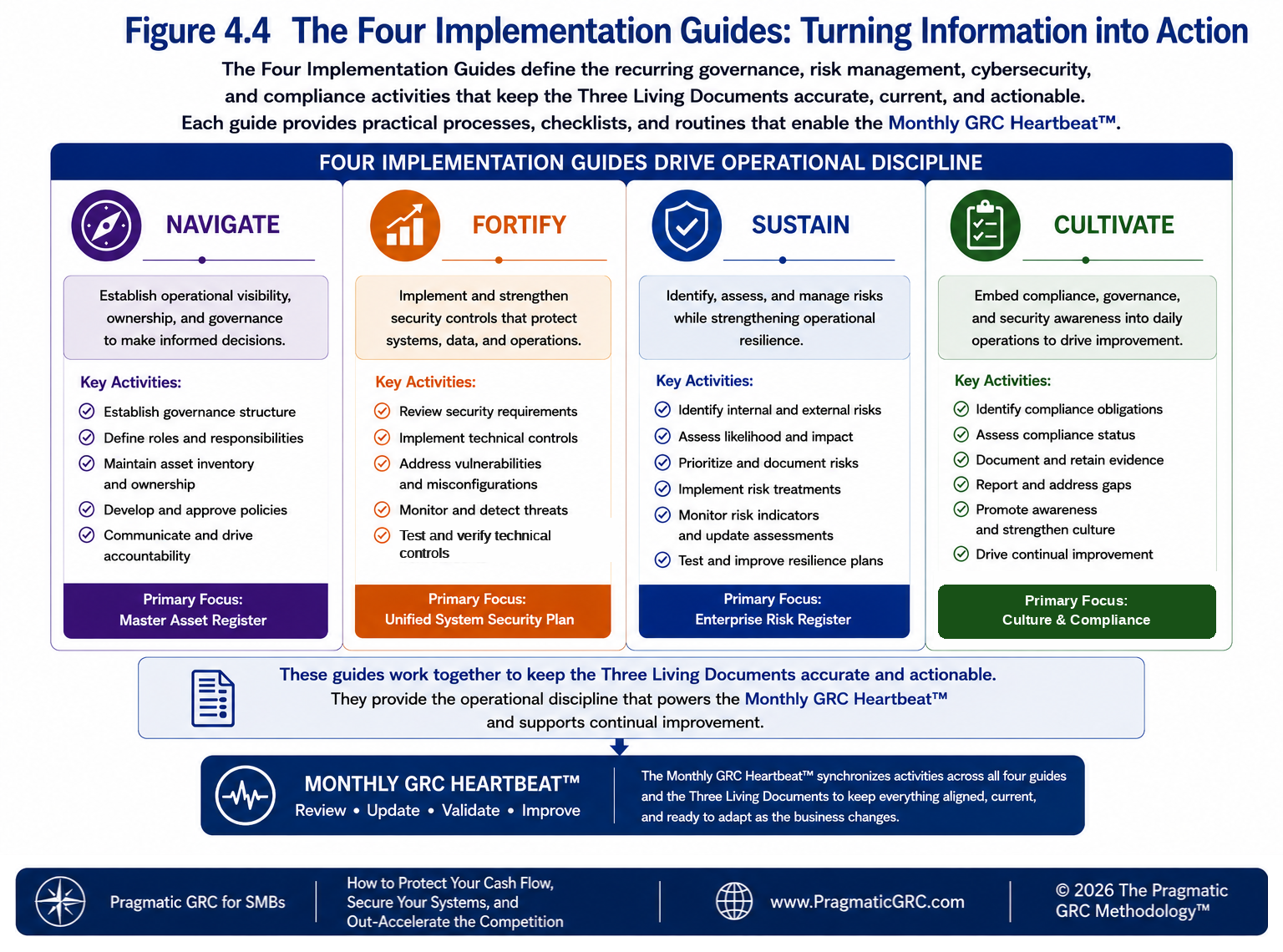 Figure 4.4 · Click to enlarge
How to use this page
Getting started
- Not sure where to begin? Use Which guide do I need right now? and pick what’s happening in your business.
- Under Inside each guide, choose a guide to see what it covers and when to use it.
- Choose Download the guide (PDF) for a copy to share with your team.
Four guides, four jobs
Most businesses work through them in order the first time, then return to whichever one the moment calls for.
Which guide do I need right now?
Pick what’s happening in your business and we’ll point you to the right guide.
Inside each guide i
Fortify Protect what matters
Fortify translates security policies into technical safeguards. It focuses on identity management, system hardening, vulnerability management, and protecting business systems through repeatable technical practices.
What it covers
- Enforcing Multi-Factor Authentication (MFA) and Single Sign-On (SSO) everywhere.
- Staging and deploying critical security patches in under 14 days.
- Least privilege: giving people access only to what their role actually requires.
- Hardening employee devices, cloud environments, and networks by closing off settings and access points attackers could exploit.
When to use it
- Implementing new hardware, software, or cloud services
- Performing routine security maintenance
- Responding to newly discovered vulnerabilities
- Preparing for customer security questionnaires or audits
- Reviewing third-party vendor security
- After a significant technology change or system upgrade
Member Plus includes the full Fortify toolkit
- Who should own it and who should be in the room
- The common mistakes to avoid
- A tick-off success check that saves your progress and shows your next steps
- The templates matched to this guide, and the question to ask at every Monthly GRC Heartbeat™
Sustain Stay running through disruption
Sustain focuses on maintaining business operations when disruption occurs. It supports risk treatment, business continuity, disaster recovery, and incident response activities that reduce operational downtime.
What it covers
- Triage, containment, and eradication of active security incidents: assess severity, stop the spread, then fully remove the threat.
- Independent backup restoration tests and data integrity checks.
- Manual workarounds for when a payment gateway or cloud platform goes down.
- Driving risk burn-down: the pace at which open risks are closed out over time.
When to use it
- Developing or updating Business Continuity and Disaster Recovery plans
- Responding to cybersecurity incidents
- Recovering from system outages or disasters
- Testing backup restoration procedures
- Conducting annual business continuity exercises
- Reviewing high-priority risks in the Enterprise Risk Register
Member Plus includes the full Sustain toolkit
- Who should own it and who should be in the room
- The common mistakes to avoid
- A tick-off success check that saves your progress and shows your next steps
- The templates matched to this guide, and the question to ask at every Monthly GRC Heartbeat™
Cultivate Make it part of the culture
Cultivate develops the human side of governance by integrating GRC into hiring, onboarding, training, leadership, and organizational culture.
What it covers
- Revoking a departing user’s access in under 60 minutes with the offboarding protocol.
- Short, routine phishing and social engineering quizzes inside the tools your team already uses.
- Security checkpoints built into hiring, role changes, and exits.
- Moving governance from an annual administrative event to an everyday leadership habit.
When to use it
- Onboarding new employees
- Changing employee roles or responsibilities
- Offboarding personnel
- Conducting security awareness training
- Reinforcing governance responsibilities during team meetings
- Reviewing accountability during the Monthly GRC Heartbeat™
Member Plus includes the full Cultivate toolkit
- Who should own it and who should be in the room
- The common mistakes to avoid
- A tick-off success check that saves your progress and shows your next steps
- The templates matched to this guide, and the question to ask at every Monthly GRC Heartbeat™
Keep all four working, every month
The Monthly GRC Heartbeat™ checks in on each guide with one question, so the routines stay alive after the first 90 days.